

In this post
What happened in the recent cases
In September, a developer on r/Wordpress described a cleanup that failed twice. Visitors saw a fake Cloudflare “Verify you are human” box, the kind that tries to trick people into pasting a command into their computer. The team removed all the malicious PHP files. Within 24 hours, everything was back.
The reason: the files weren’t the malware’s “source of truth”. They were just copies.
The three layers that restore each other
Based on that write-up and what the community added, the infection had three layers:
- The database. Large base64 blobs stored in
wp_optionsas transients with innocent names such as_site_transient_health_*. Real site-health transients are small. These were 125–225 KB each. - Files. Fake plugins with believable names (cache, performance, security headers), several must-use plugins in
wp-content/mu-plugins, and copies hidden inwp-includesanduploads. - Boot code. A small block in
wp-config.phpand a fakewp-content/object-cache.phpthat rebuilt the plugin from the database on every request, plus hourly cron jobs doing the same.
Delete layer 2, and layer 3 rebuilds it from layer 1 on the next page view. Clean the database, and a surviving file writes it back. You have to break all three at once.
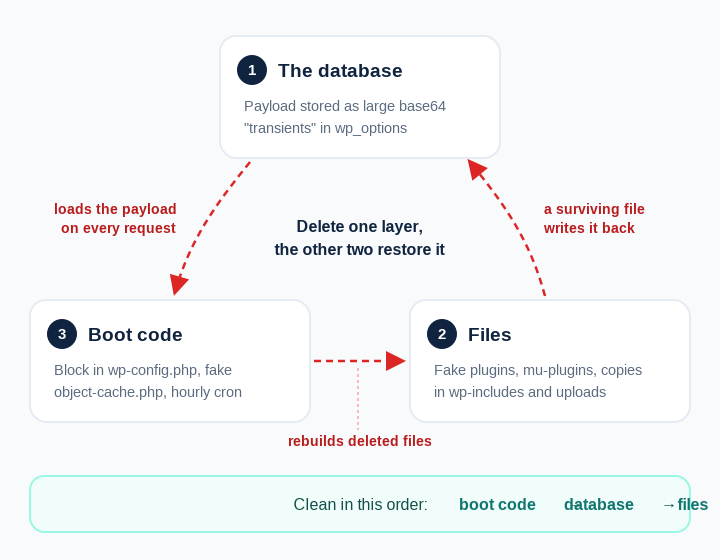
The same case also showed hidden administrators with service-like names (wpsvc_* and similar) and extra REST API routes registered under a core-looking namespace, so the attacker could talk to the site even after logins were reset.
Why mu-plugins are such a good hiding place
Must-use plugins load automatically, before normal plugins, whenever a PHP file sits in wp-content/mu-plugins. They can’t be deactivated in wp-admin, and they only appear under a small “Must-Use” tab on the Plugins screen that hardly anyone opens.
Hosts use this folder too. Hostinger, Installatron, managed WordPress platforms and others put their own files there. That makes it easy for a malicious file to blend in. In a related discussion on r/ProWordPress, a security plugin developer pointed out the obvious problem: a backdoor can be called hostinger-anything.php just as easily.
How I’d judge a file in mu-plugins:
- Does your host, or a plugin you use, document it? Ask the host if you’re unsure.
- If you manage several sites at the same host, is the same file, with the same content, on all of them? The odd one out deserves a closer look.
- Read it. Host files are usually readable code. Long encoded strings,
eval, and code that downloads or writes other files are red flags.
The backup that attacked the person restoring it
In November, a freelancer on r/Wordpress shared an even nastier variant. A “client” sent a site export and asked them to run it locally on their own computer before starting the job. WordPress core in the export was 100% clean. But mu-plugins contained a third file next to two legitimate host files. It looked for a “JPEG” in uploads, renamed it to .exe and tried to run it. The “image” was actually a Windows program, reportedly a password stealer.
Two lessons from that one:
- Don’t open site backups you didn’t make on your own computer without checking them first, especially when someone insists you run them locally.
- “Core matches the checksums” says nothing about wp-content. Check mu-plugins by hand, and check that images are really images:
find wp-content/uploads -type f \( -iname "*.jpg" -o -iname "*.jpeg" -o -iname "*.png" -o -iname "*.gif" \) -exec file {} + | grep -viE "image data|JPEG|PNG|GIF"
The cleanup order that breaks the loop
- Stop the traffic. Block the site temporarily (an
.htaccessrule or your host’s tools). WordPress maintenance mode isn’t enough, because the code still runs. - Back up the infected state. You may need it to work out what happened.
- Remove the boot code first: the injected block in
wp-config.php, anobject-cache.phpyou didn’t install, and unknown files inmu-plugins. - Clean the database: suspicious large transients, unknown cron hooks, injected scripts, unknown administrators. Until step 3 is done, do this in phpMyAdmin, not WP-CLI. One commenter noted that running WP-CLI can trigger the restore code. A safe, read-only first look:
SELECT option_name, LENGTH(option_value) AS size
FROM wp_options
WHERE option_name LIKE '\_site\_transient\_%' OR option_name LIKE '\_transient\_%'
ORDER BY size DESC LIMIT 20;
- Replace core, plugins and themes with fresh copies instead of editing them.
- Close the other doors, which community members rightly added:
- application passwords (they survive password changes and salt resets);
- other sites in the same hosting account, which often reinfect each other;
- an infected service worker in the admin’s browser, which can bring the infection back when they log in.
- Find the entry point, then change every password and the salts.
From my cleanup work: when a client tells me “it came back overnight”, I don’t start with the files anymore. I start with wp-config.php, mu-plugins, object-cache.php and the biggest rows in wp_options. That’s where the restore logic usually lives. Deleting what the scanner flagged is the last step, not the first.
If you’re stuck in this loop, my page on malware that keeps coming back explains how I handle it, and what it costs.