

In this guide
The most common ways in
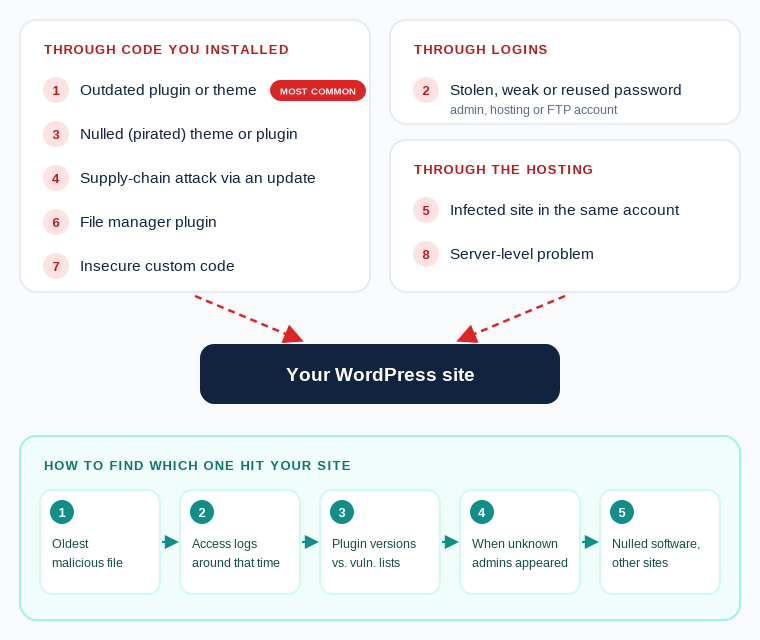
1. An outdated plugin or theme with a known vulnerability
By far the most common. A security hole is found and published, a fix is released, and bots start scanning for sites that haven’t updated, often within days. Page builders, form plugins, sliders and file managers are frequent examples, simply because they’re popular and complex.
2. Stolen, weak or reused passwords
An admin password that was also used on another site that got breached, or a weak hosting or FTP password. Attackers try leaked credentials automatically and in bulk.
3. Nulled (pirated) themes and plugins
“Free” copies of premium software often come with a backdoor already inside. The site is compromised the moment you install it. See WP-VCD malware for the best-known example.
4. Supply-chain attacks
A genuine plugin update, or a trusted management service, delivers malware. That happened in October 2026 with Rank Math PRO and UpdraftCentral. There have also been cases where a plugin was sold to a new owner who added malicious code in an update. Rare, but very hard to defend against.
5. Another infected site in the same hosting account
On shared hosting, sites under the same user can usually write to each other’s files. An old, forgotten site or staging copy gets hacked and infects everything next to it.
6. File manager and “maintenance” plugins
Plugins that let you edit files from the dashboard are powerful, which makes them a favorite target when they have vulnerabilities. They’re best removed once you’re done with them.
7. Insecure custom code
Custom themes and plugins, increasingly AI-generated ones, with missing input checks or unsafe file uploads.
8. Server-level problems
An outdated PHP version, a vulnerable control panel, or a compromised hosting account. Less common, but they happen, and no WordPress plugin can protect against them.
How to find out how your site was hacked
- Find the oldest malicious file. From your infected backup, check modification dates:
ls -la --time-style=full-iso. The earliest one is closest to the break-in. Keep in mind that malware sometimes fakes dates. - Read the access logs around that time. Look for POST requests to plugin files, unusual URLs, or logins from unfamiliar IPs. The plugin folder named in those requests is often your culprit.
- Check your plugin versions against vulnerability databases such as WPScan, Patchstack or Wordfence Intelligence.
- Look at the admin users: when the unknown ones were created, and which account was used to create them.
- Check for nulled software and for other sites in the account.
You won’t always get a 100% certain answer. Logs may be missing, or there may be several weaknesses. But there’s almost always a most-likely cause, and fixing it is what stops the next hack.
From my cleanup work: in most cleanups, the logs tell the story within minutes: a burst of POST requests to one plugin’s folder, followed by a new PHP file appearing in uploads, followed by a new admin user. The plugin is usually one that’s been out of date for months. Updating it is a one-click fix that would have prevented the whole thing.
Make sure it can’t happen again
Work through how to secure WordPress after a hack and the WordPress security checklist. If you’d like an expert to look for weak spots before an attacker does, a security audit costs $70.